Lighthouse Friesland's Skyscrapersim Building Creator: Difference between revisions
mNo edit summary |
m →Tools |
||
| (9 intermediate revisions by the same user not shown) | |||
| Line 1: | Line 1: | ||
{{Legit}} | {{Legit}} | ||
'''Lighthouse Friesland's Skyscrapersim Building Creator''' (''or simply '''LF Building Creator''''', abbreviation is '''LFBC''') is another online [[Building Creators|building creator]] for [[Main Page#About Skyscrapersim|Skyscrapersim]] found and written on Scratch. It was created by user [[User:Lighthouse Friesland|Lighthouse Friesland]], but it has more features than [[Skyscrapersim Building Creator Reloaded]] | '''Lighthouse Friesland's Skyscrapersim Building Creator''' (''or simply '''LF Building Creator''''', abbreviation is '''LFBC''') is another online [[Building Creators|building creator]] for [[Main Page#About Skyscrapersim|Skyscrapersim]] found and written on Scratch. It was created by user [[User:Lighthouse Friesland|Lighthouse Friesland]], but it has more features than [[Skyscrapersim Building Creator Reloaded]]. | ||
* It allows you to create some features which are not included in [[Skyscrapersim Building Creator Reloaded]]. (such as doors, etc.) | * It allows you to create some features which are not included in [[Skyscrapersim Building Creator Reloaded]]. (such as doors, etc.) | ||
* This building creator is the spiritual successor of Skyscrapersim Building Creator Reloaded as the development of the building creator has been discontinued. | |||
* This building creator is the successor of Skyscrapersim Building Creator Reloaded as the development of the building creator has been discontinued. | |||
== Notes == | |||
*This building creator won't work with Beno Skyscrapersim and official Skyscrapersim versions before 2016 | |||
*The elevator sizes feature was discontinued due to much time consumption (it will be continued in Version 4.0) | |||
*You need to download EG881 Integration Project first if you want to create a building with this creator, because it contains ObjectPlus scripts | |||
**EG881's Integration Project can be downloaded from https://custom.skyscrapersim.net/downloads/EG881/ | |||
== Tools == | == Tools == | ||
* | *'''Action buttons''' | ||
* | **A feet ruler where positions will be easily found is needed (until 3.0.3). | ||
* | **[-] and [+] buttons: used for changing floors | ||
**Finish button: This will take you to the screen to set your spawn point and then show the building code. | |||
* ''' | **Clear button: used for clearing the entire building so it is blank | ||
*'''Building set:''' | |||
**Draw Rooms: used to draw rooms | |||
**Draw Walls: used to draw walls | |||
**Cut Walls: typically used so rooms cain join together | |||
== Text Tutorial == | == Text Tutorial == | ||
1. Click "Create a new building" (not working temporarily). Instead, click "Create a new building using a template", then choose "Simple building" | 1. Click "Create a new building" (not working temporarily). Instead, click "Create a new building using a template", then choose "Simple building" | ||
2. To draw a blueprint, click "Draw Rooms". You will be asked to choose the coordinates, which takes a bit time (in | |||
2. To draw a blueprint, click "Draw Rooms". You will be asked to choose the coordinates, which takes a bit time (in 4.0, you will drag your mouse from one point in the grid to another to draw a room - this will save you time). You can also draw walls by clicking "Draw Walls", but you will be asked again to choose the coordinates (in 4.0, you will also drag your mouse from one point in the grid to another to draw a wall) | |||
3. To change floors, press the - and + buttons next to the floor counter | 3. To change floors, press the - and + buttons next to the floor counter | ||
*The range is currently from 0 to 200 (in 4.0, the range will be from -20 to 200) | |||
4. Click "Create elevators" to add in elevators/lifts so other floors can be accessed easily. Also, you will be asked to type the coordinates, the floor range (e.g. from 0 to 3), the size, the count of elevators in a shaft, the name of the elevator, the type of the lift, the speed, the pre-doors value, the (shaft) doors position, etc. (in | |||
4. Click "Create elevators" to add in elevators/lifts so other floors can be accessed easily. Also, you will be asked to type the coordinates, the floor range (e.g. from 0 to 3), the size, the count of elevators in a shaft, the name of the elevator, the type of the lift, the speed, the pre-doors value, the (shaft) doors position, etc. (in 4.0, this feature will have it's own UI, less of questions to save time) | |||
5. Click "Create stairwells" to add in stairwells so that in case of fire, people can get out safely. | 5. Click "Create stairwells" to add in stairwells so that in case of fire, people can get out safely. | ||
6. Click "Finish building" to finish your building, but before, you will be asked to choose the starting point coordinates (in | |||
6. Click "Finish building" to finish your building, but before, you will be asked to choose the starting point coordinates (in 4.0, you will drag your mouse to a point instead of two questions) | |||
7. Right click on the building list and click "Export". Because this is Scratch 3.0, you will not be able to save as a certain file and will automatically download as "Building Script.txt". Rename the file to e.g. Tower.bld and copy and paste it into the buildings folder of Skyscrapersim. | 7. Right click on the building list and click "Export". Because this is Scratch 3.0, you will not be able to save as a certain file and will automatically download as "Building Script.txt". Rename the file to e.g. Tower.bld and copy and paste it into the buildings folder of Skyscrapersim. | ||
8. Run Skyscrapersim and load your building! | |||
8. Run Skyscrapersim and load your building! | |||
== Legend == | == Legend == | ||
| Line 32: | Line 48: | ||
== Changelog == | == Changelog == | ||
Note that the version 1.x series were the early stages of LF Building Creator. | Note that the version 1.x series were the early stages of LF Building Creator. | ||
* Version 4.0 WIP (not yet publicly available; since 02/03/2026): System change ("Create a building" button doesn't work temporarily) | |||
* Version 3.0.3 (22/03/2026): When pressing the [-] button while you're editing the ground floor or when pressing the [+] button while editing the 200th floor, it will say "You've reached the floor limit from 0 to 200" for 4 seconds, that makes the floor limit clear. | |||
* Version 3.0.2 (21/06/2025): Fixed issue where <code><EndFloor></code> didn't add itself while clicking on "Finish" | * Version 3.0.2 (21/06/2025): Fixed issue where <code><EndFloor></code> didn't add itself while clicking on "Finish" | ||
* Version 3.0.1 (Finished 11/08/2024): Added "Edit" and "Create a building using a template" buttons, Renewed system for the "Choose texture" feature so there's no any questions anymore and is now like in [[BBC]]. + Added [[Simple - LF Testing]] as a pre-loaded building template + Added "sliding door" feature (Only supported in 1.12 Alpha/2.0 Beta) | * Version 3.0.1 (Finished 11/08/2024): Added "Edit" and "Create a building using a template" buttons, Renewed system for the "Choose texture" feature so there's no any questions anymore and is now like in [[BBC]]. + Added [[Simple - LF Testing]] as a pre-loaded building template + Added "sliding door" feature (Only supported in 1.12 Alpha/2.0 Beta) | ||
* A big update | * A big update! Version 3.0 (04/10/2023; Finish date 30/03/2024): added elevator sizes feature (discontinued) + fixed bugs on the choose texture script + added cut walls feature + changed script in add escalators feature (before was the AddEscalator command and now is the OP_Escalator command) + fixed an issue in the escalators script (it will not show any error message again when you create escalators) | ||
* Version 2.6 (26/09/2023): added lifts with different doors feature | * Version 2.6 (26/09/2023): added lifts with different doors feature | ||
* A quite big update | * A quite big update! Version 2.5 (23/09/2023 + 25/09/2023): fixed some bugs on escalator (pen generator) + got 10 escalator textures + fixed bugs on the elevator external wall (should be {[elevator x position] - 4} not {[elevator x position] - 2} | ||
* Version 2.3 (20/09/2023): changed something in lifts feature | * Version 2.3 (20/09/2023): changed something in lifts feature | ||
* Version 2.2 (19/09/2023): Draw walls feature | * Version 2.2 (19/09/2023): Draw walls feature | ||
Latest revision as of 05:02, 22 March 2026
It contains good-faith information, such as an existing building or content. |
Lighthouse Friesland's Skyscrapersim Building Creator (or simply LF Building Creator, abbreviation is LFBC) is another online building creator for Skyscrapersim found and written on Scratch. It was created by user Lighthouse Friesland, but it has more features than Skyscrapersim Building Creator Reloaded.
- It allows you to create some features which are not included in Skyscrapersim Building Creator Reloaded. (such as doors, etc.)
- This building creator is the spiritual successor of Skyscrapersim Building Creator Reloaded as the development of the building creator has been discontinued.
Notes[edit | edit source]
- This building creator won't work with Beno Skyscrapersim and official Skyscrapersim versions before 2016
- The elevator sizes feature was discontinued due to much time consumption (it will be continued in Version 4.0)
- You need to download EG881 Integration Project first if you want to create a building with this creator, because it contains ObjectPlus scripts
- EG881's Integration Project can be downloaded from https://custom.skyscrapersim.net/downloads/EG881/
Tools[edit | edit source]
- Action buttons
- A feet ruler where positions will be easily found is needed (until 3.0.3).
- [-] and [+] buttons: used for changing floors
- Finish button: This will take you to the screen to set your spawn point and then show the building code.
- Clear button: used for clearing the entire building so it is blank
- Building set:
- Draw Rooms: used to draw rooms
- Draw Walls: used to draw walls
- Cut Walls: typically used so rooms cain join together
Text Tutorial[edit | edit source]
1. Click "Create a new building" (not working temporarily). Instead, click "Create a new building using a template", then choose "Simple building"
2. To draw a blueprint, click "Draw Rooms". You will be asked to choose the coordinates, which takes a bit time (in 4.0, you will drag your mouse from one point in the grid to another to draw a room - this will save you time). You can also draw walls by clicking "Draw Walls", but you will be asked again to choose the coordinates (in 4.0, you will also drag your mouse from one point in the grid to another to draw a wall)
3. To change floors, press the - and + buttons next to the floor counter
- The range is currently from 0 to 200 (in 4.0, the range will be from -20 to 200)
4. Click "Create elevators" to add in elevators/lifts so other floors can be accessed easily. Also, you will be asked to type the coordinates, the floor range (e.g. from 0 to 3), the size, the count of elevators in a shaft, the name of the elevator, the type of the lift, the speed, the pre-doors value, the (shaft) doors position, etc. (in 4.0, this feature will have it's own UI, less of questions to save time)
5. Click "Create stairwells" to add in stairwells so that in case of fire, people can get out safely.
6. Click "Finish building" to finish your building, but before, you will be asked to choose the starting point coordinates (in 4.0, you will drag your mouse to a point instead of two questions)
7. Right click on the building list and click "Export". Because this is Scratch 3.0, you will not be able to save as a certain file and will automatically download as "Building Script.txt". Rename the file to e.g. Tower.bld and copy and paste it into the buildings folder of Skyscrapersim.
8. Run Skyscrapersim and load your building!
Legend[edit | edit source]
- Yellow Circle = Camera Position
- Blue Square = Building/Room
- Red Square = Escalator
- Purple Square = Ramp
Changelog[edit | edit source]
Note that the version 1.x series were the early stages of LF Building Creator.
- Version 4.0 WIP (not yet publicly available; since 02/03/2026): System change ("Create a building" button doesn't work temporarily)
- Version 3.0.3 (22/03/2026): When pressing the [-] button while you're editing the ground floor or when pressing the [+] button while editing the 200th floor, it will say "You've reached the floor limit from 0 to 200" for 4 seconds, that makes the floor limit clear.
- Version 3.0.2 (21/06/2025): Fixed issue where
<EndFloor>didn't add itself while clicking on "Finish" - Version 3.0.1 (Finished 11/08/2024): Added "Edit" and "Create a building using a template" buttons, Renewed system for the "Choose texture" feature so there's no any questions anymore and is now like in BBC. + Added Simple - LF Testing as a pre-loaded building template + Added "sliding door" feature (Only supported in 1.12 Alpha/2.0 Beta)
- A big update! Version 3.0 (04/10/2023; Finish date 30/03/2024): added elevator sizes feature (discontinued) + fixed bugs on the choose texture script + added cut walls feature + changed script in add escalators feature (before was the AddEscalator command and now is the OP_Escalator command) + fixed an issue in the escalators script (it will not show any error message again when you create escalators)
- Version 2.6 (26/09/2023): added lifts with different doors feature
- A quite big update! Version 2.5 (23/09/2023 + 25/09/2023): fixed some bugs on escalator (pen generator) + got 10 escalator textures + fixed bugs on the elevator external wall (should be {[elevator x position] - 4} not {[elevator x position] - 2}
- Version 2.3 (20/09/2023): changed something in lifts feature
- Version 2.2 (19/09/2023): Draw walls feature
- Version 2.1 (18/09/2023; Finished 19/09/2023): Draw rooms feature
- Version 2.0 (18/09/2023): Ramps feature + Changing floors feature
- Version 1.7 (17/09/2023; Finished 18/09/2023): Create stairwells feature
- Version 1.6.1 (14/09/2023; Finished 17/09/2023): Recreation of create elevators/lifts feature
- Version 1.6 (12/09/2023; Finished 13/09/2023): added create elevators/lifts feature (Unfortunately deleted)
- Version 1.5 (12/09/2023): set swing doors count and moving walkway count to 0
- Version 1.4 (11/09/2023): added create moving walkway feature + fixed a bug on finish sprite as it wasn't showing the background (showed when finished building).
- Version 1.3 (11/09/2023): added create swing doors feature
- Version 1.2 (11/09/2023): added create revolving doors feature
- Version 1.1 (11/09/2023): fixed a minor issue with the syntax (should be "AddGround Ground, Downtown, -158400, -158400, 158400, 158400, 0, 7920, 7920", not "AddGround Ground, Downtown, -158400, -158400, 158400, 158400, 0, 7920, 7920 Cut Landscape, -20, -1, -20, 20, 1, 20, false, true")
- Version 1.0 (10/09/2023): released, added create vehicles feature
Screenshots[edit | edit source]
-
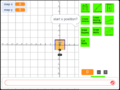 LF Building Creator editing a building
